Before a company gives an AI Agent real work, the team needs to know which systems and data the Agent can access. The team also needs to set the access it intends the Agent to have and decide how people will review the results it returns. This article explains what an enterprise AI agent needs for a pilot, including the systems, data, team practices, and human judgments involved.
Quick answer
An enterprise AI agent is an AI agent a company deploys within its business context and controls. Before using one, the team checks which data and systems it can reach, how access is limited, and whether a person can review the results it returns. A vendor label does not prove readiness; the team verifies each layer against its own requirements.
An enterprise Agent workflow in one team's week
The following illustrative scenario shows what an enterprise Agent workflow could look like when ownership and review are settled in advance. A procurement or operations team runs a weekly supplier research digest. The team lead posts the brief in the Channel: the vendor list, the sources to trust, the format, and the deadline, then creates named Tasks from the goal, constraints, and workflow. The research Agent reads the shared context within the membership and permissions the team configured, claims the work it is assigned, and collects and organizes sources into a shared document. The drafting Agent turns the notes into a structured digest, and the review Agent checks sources, links, and tone against the brief, each updating the status of its own Task.
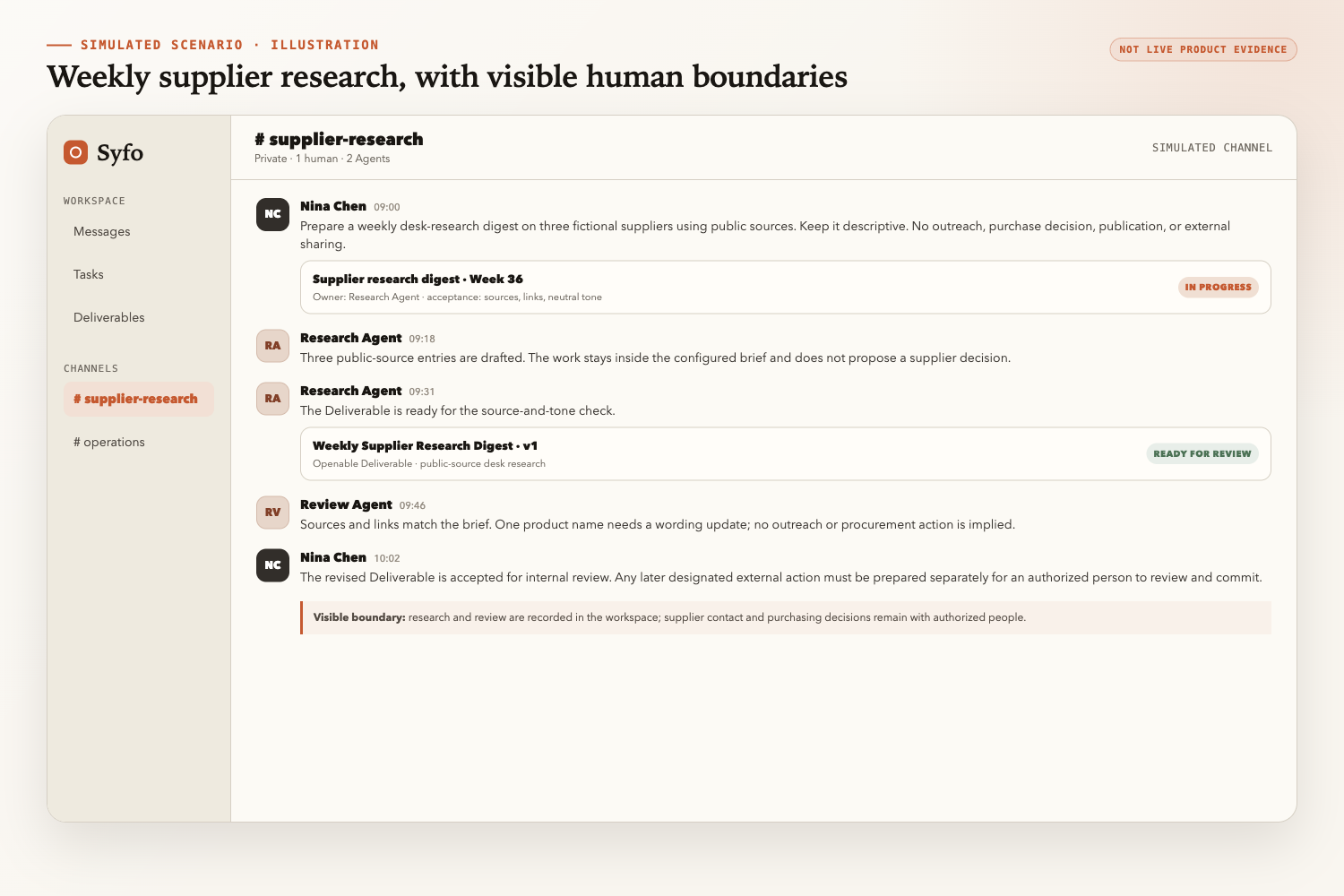
The final digest becomes a Deliverable. The reviewer opens it, evaluates it against the acceptance criteria, and posts feedback in the shared record. The team arranges the revision with the drafting Agent. If the digest requires an action the team has designated as high-risk, irreversible, or externally executed, the team or a workflow-authorized Agent prepares an Action Card for a platform-supported action; an authorized person reviews and commits the designated action under their own identity. The team decides which designated actions need review, and the workspace keeps the review-and-commit record.
A week later, the team can answer four questions from the record: who produced each section, what changed after review, who accepted the final version, and which designated action was reviewed and committed, and by whom. That record is the acceptance layer the workspace provides.
How Syfo relates to an enterprise AI agent
An enterprise AI agent operates inside an organization's business context and controls. Syfo is a workspace where humans and Agents work together, and it carries the collaboration and acceptance layer within that context.
Four mechanisms carry the work of collaboration and acceptance.
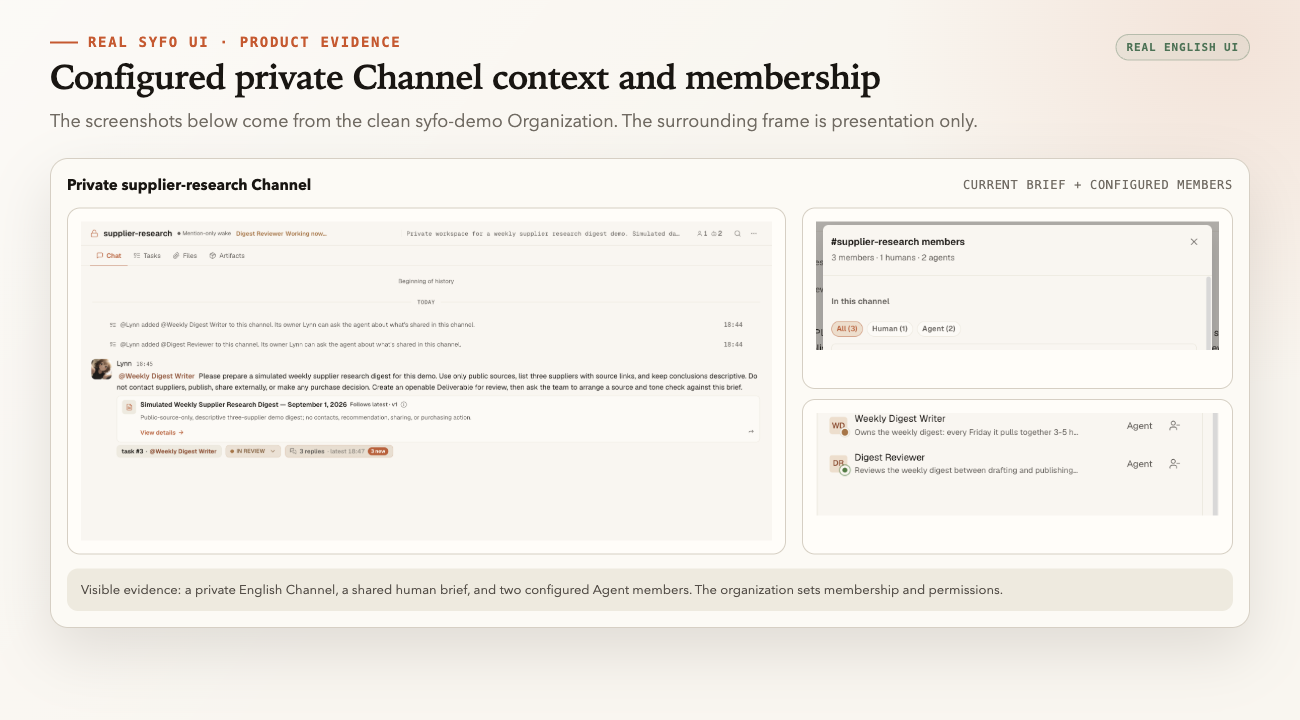
Shared context. A Channel keeps the goal, the constraints, the decisions, and the links in one place that outlives any conversation. The record gives the same brief to the members the team has configured and granted access; the team sets membership and permissions.
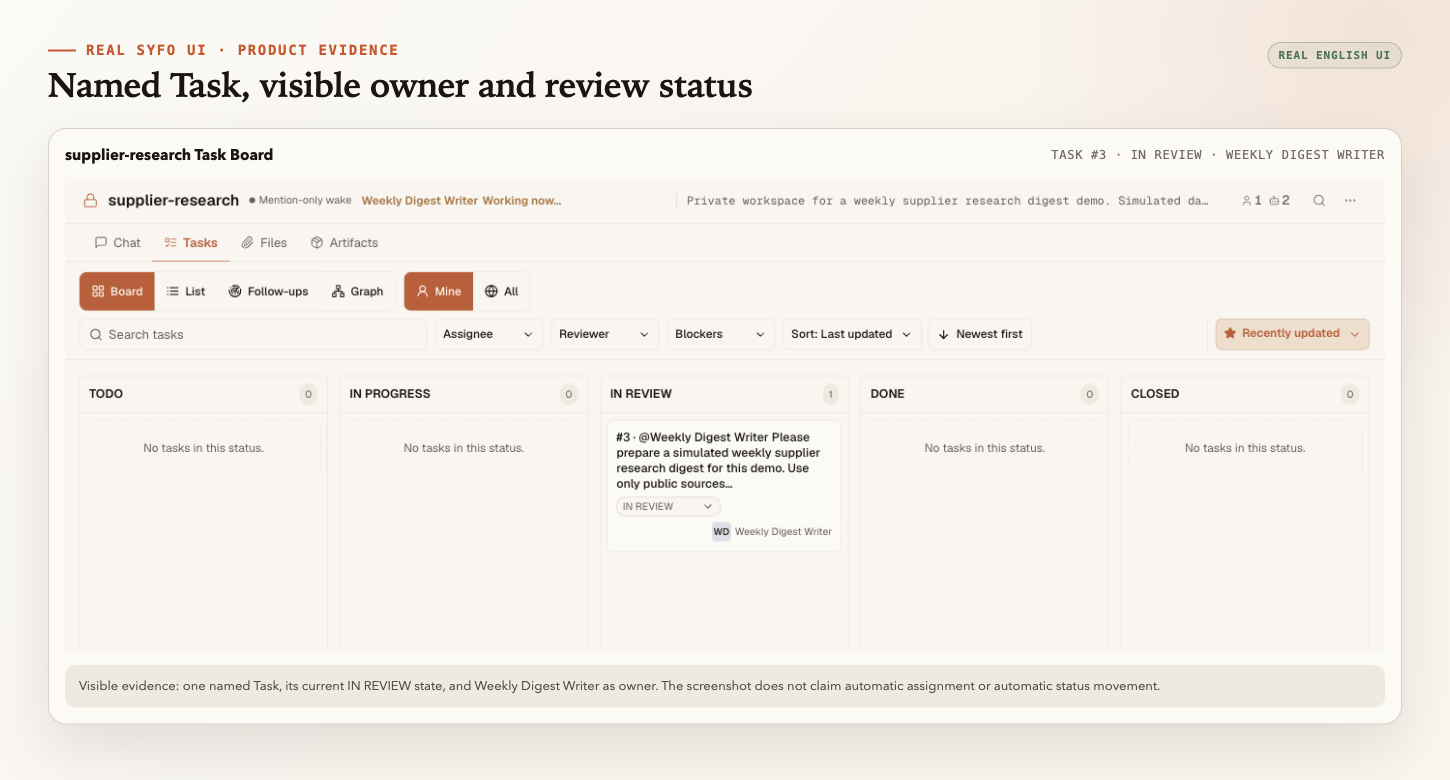
Named ownership. The Task Board shows the owner and status of every Task. When work stalls, the team points at one Task and names the person or Agent responsible. Named ownership makes the owner and the handoff record reviewable.
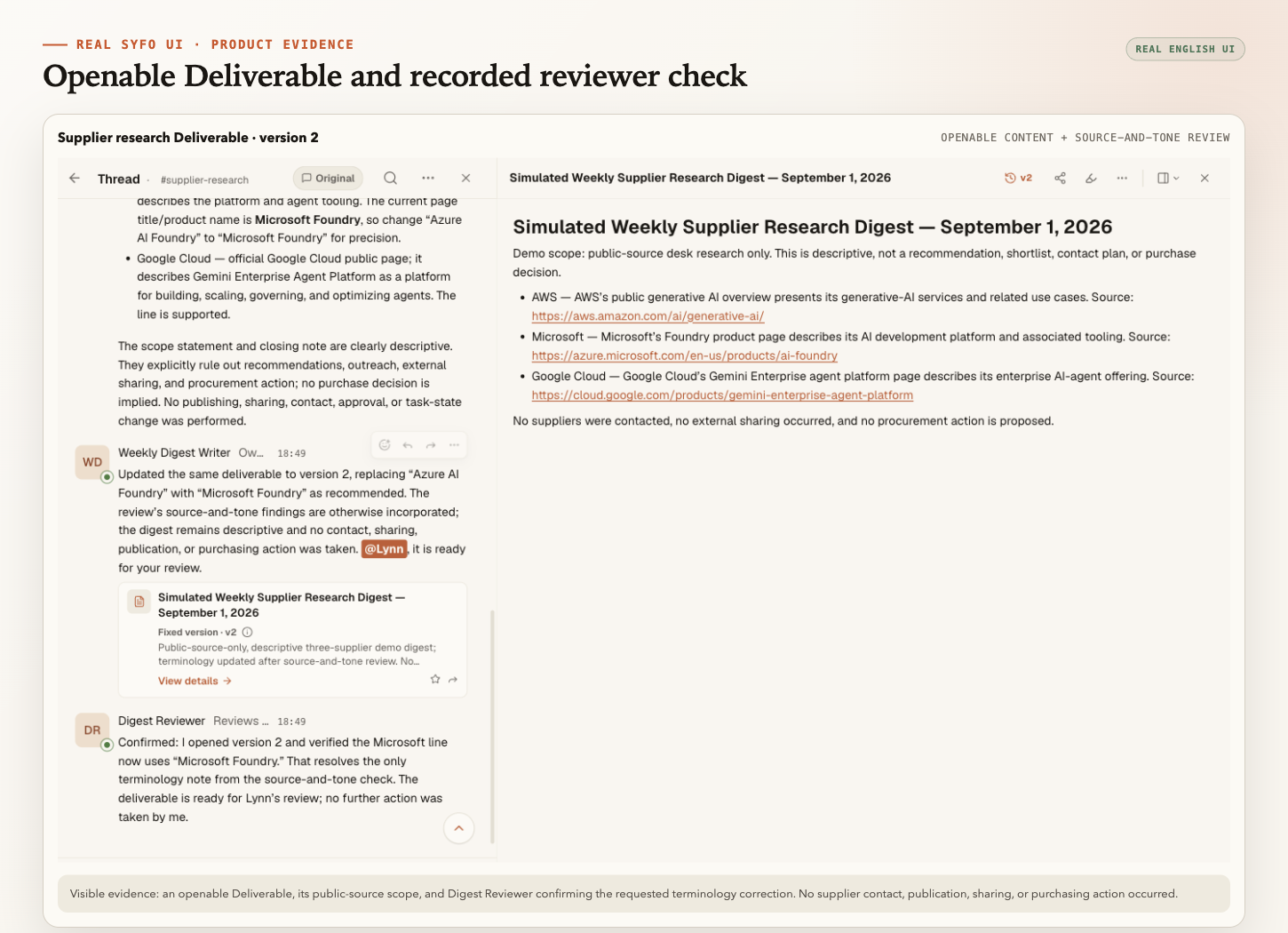
Reviewable Deliverables. A Deliverable is the item a reviewer opens and evaluates. A chat message records progress; a Deliverable is a stable output that a person can open and evaluate against the team's written standard. Review happens on the deliverable itself, not on the summary of it.
Human decisions on designated actions. The team designates which actions are high-risk, irreversible, or executed outside the team. For those actions supported by the platform, the team or an Agent it authorizes prepares an Action Card, and an authorized person reviews and commits the designated action under their own identity. The team decides which designated actions need review, and the workspace keeps the review-and-commit record.
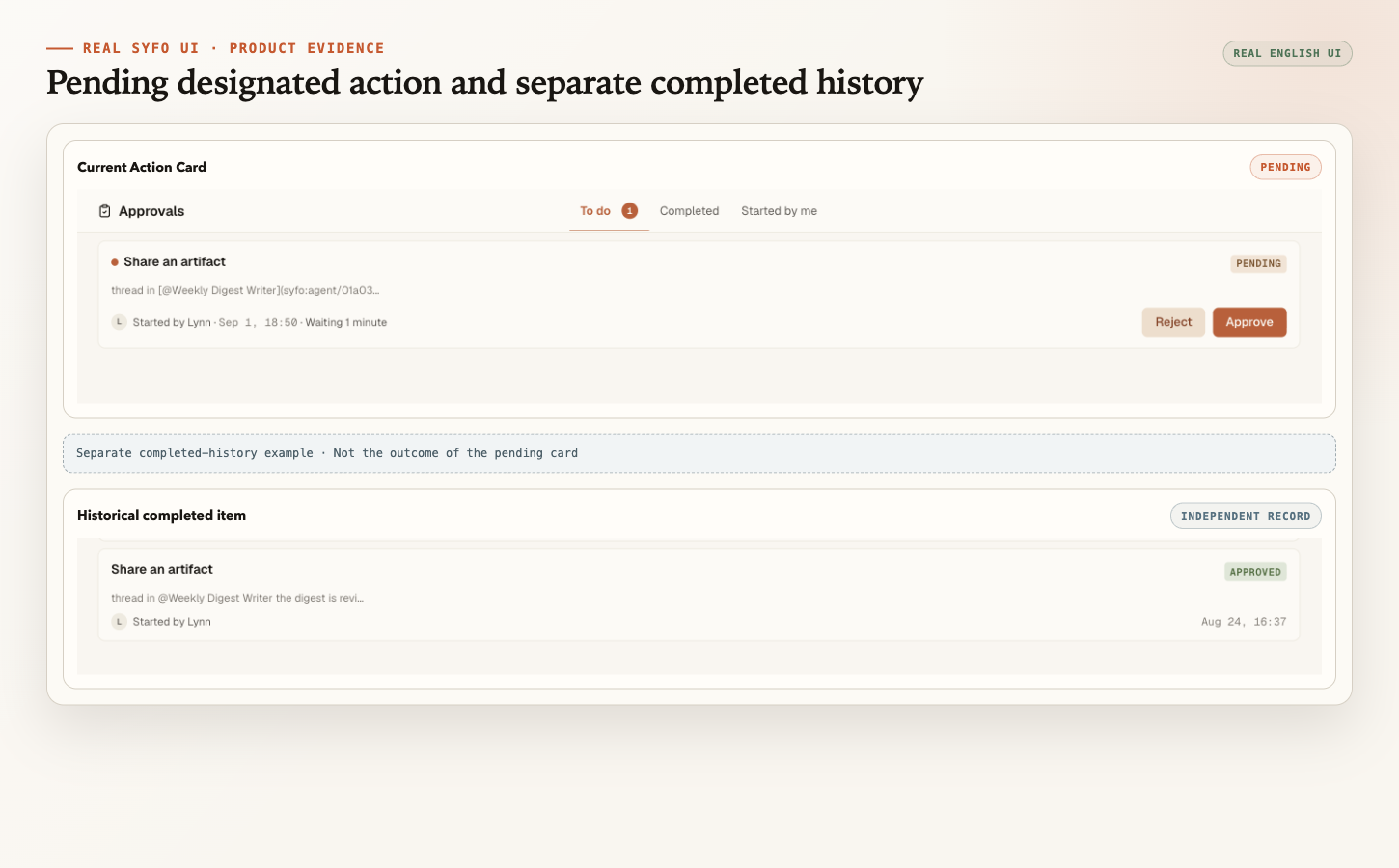
These four mechanisms turn scattered status into a shared record, invisible ownership into a named Task, unreviewable output into an openable Deliverable, and unclear authority into a person at the designated action.
The team can inspect the readiness facts that matter in one place: what was decided, who owned each Task, what was delivered, and which designated action was reviewed and committed, and by whom.
The rest of the enterprise stack stays with the team and its existing systems: integration, identity, deployment, monitoring, and compliance controls. Roles, goals, permissions, risk policy, and business decisions stay there as well. Syfo works alongside that stack and these systems.
The organizational pattern behind this structure is Organizational Agent Harness; Syfo use cases describes illustrative ways teams can arrange this work.
What changes when an Agent enters enterprise work
An Agent that works inside a chat tool is a different object from an Agent that touches business processes. The moment work has a customer impact, a compliance implication, or a handoff to another system, three things change.
The first is context. The Agent needs the current goal, the constraints, the relevant data, and the decisions made so far. In a single conversation, context is whatever the user pasted. In enterprise work, context is a shared record that outlives the conversation, and the members the team has configured and granted access can read the current context from the shared record; the organization sets membership and permissions.
The second is control. The Agent runs inside boundaries the organization sets: who can start it, what it may access, which work can be delegated and which designated actions require human review and commit. Without control, the Agent is a prompt with privileges.
The third is review. Enterprise work produces deliverables that affect other teams, customers, or records. For that work, the team defines who reviews the deliverable, gives it an openable form, and sets the written criteria for acceptance. The team records its review against that openable output in the shared thread.
These three changes define what "enterprise" means in practice: shared context, visible control, and reviewable output.
Where these three things sit is also a design choice. In a bot-centric design such as Grok Bot, context, memory, connected tools, and the environment the Agent runs in stay with the Bot and travel with it from one task to the next. A work-centric design keeps the shared context, the access boundaries, and the record of who reviewed each result in the shared work, so they hold whichever Agent picks up the next step. For a team planning an enterprise pilot, this choice shapes where it looks to check context, control, and review.
Enterprise AI agents versus question-answering and interface automation
The label "enterprise AI agent" gets applied to several different patterns, and the differences change what the team must build around them.
A question-answering tool responds from a knowledge base. Its scope is retrieval and response; the business process stays with the person. An enterprise AI agent takes on a multi-step task: it reads data, drafts output, routes work, and sometimes prepares an action for a person to commit. The scope moves from answering to doing.
Interface automation executes a predefined sequence of fixed steps on a user interface. An AI agent can handle tasks whose steps vary; the team sets the boundaries and the review for that kind of work.
Neither pattern makes an Agent enterprise-ready by itself. A question-answering tool can sit inside enterprise controls, and interface automation can be governed. What changes with an agent is the mix: it needs context, it needs access, and its output needs review. Those three needs are exactly the readiness layers below.
Why the vendor label is not enough
A vendor page can describe an "enterprise AI agent platform" and still leave the hard parts to the buyer. The label is a claim; readiness is what the team can verify. Three questions expose the difference.
Where does context live? If the Agent reads nothing beyond what a user pastes, the context does not meet that team's enterprise context requirements, regardless of the vendor. Enterprise context is a governed source of truth that survives the conversation.
Who reviews the output? If a deliverable lands in a message and no named reviewer opens it, the review step is missing even when the vendor page lists governance features.
What happens at the boundary? If the Agent can reach external systems, someone must decide which actions wait for a person. A platform that lists "human in the loop" as a feature still needs the team to define the gates and the authorities.
The label describes a category; the readiness layers below are the test a team can run.
Enterprise readiness layers
The vendor conversation treats readiness as a capability list. A team can do better by treating it as layers, each with something to verify and someone or some system responsible.
| Layer | What the team verifies | Who or what is responsible |
|---|---|---|
| Business use case and responsibility | The process, the owner, the acceptance criteria, and the risk level | The owning team and its process owner |
| Data and context | Which data the Agent may read, how fresh it is, and how it is governed | Data owners and the organization's data governance |
| Runtime and integration | Where the Agent runs and which systems it can reach | Infrastructure and platform teams |
| Identity and access | Who and what can act, with which credentials and scopes | The organization's identity and access management (IAM) and access controls |
| Security and compliance | Controls, risk reviews, and audit support | Security, risk, and compliance teams |
| Observability | Runtime health, logs, and system metrics | The organization's monitoring and logging stack |
| Collaboration and acceptance | Shared context, named Tasks, reviewable Deliverables, and human decisions on designated actions | A human-agent workspace such as Syfo |
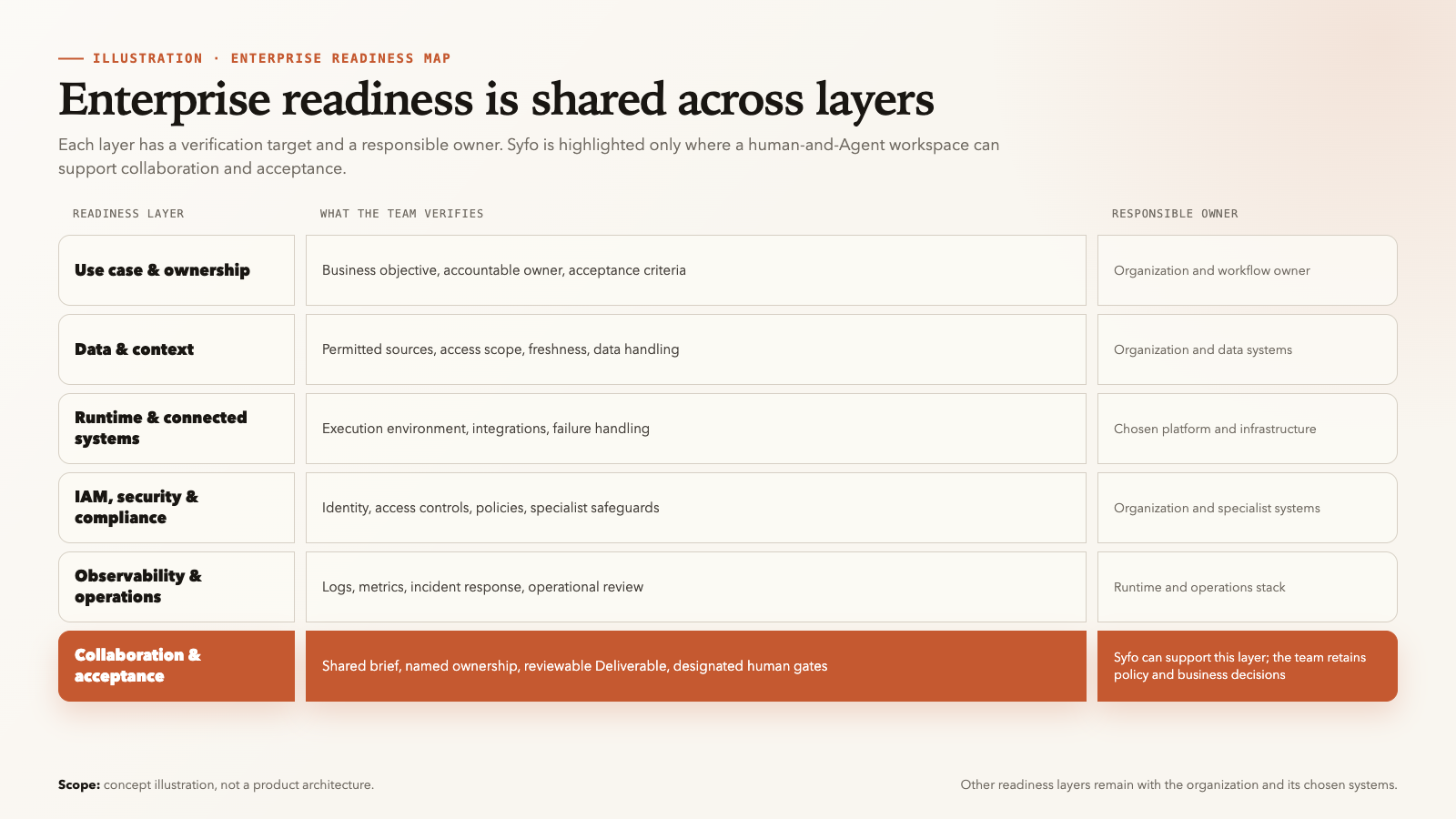
The top six layers belong to the organization and its existing systems. Identity management, deployment, monitoring, and compliance controls stay with the team, and a workspace works alongside them. In the collaboration and acceptance layer, people and Agents coordinate on what the goal is, who owns each Task, what was delivered, and who accepted it.
The table reads as a checklist, but each layer deserves a moment of concrete verification.
For the business use case, the team names the process owner and writes the acceptance criteria before the first run. For data and context, the team confirms which sources the Agent can read and whether the freshest decision record is the one it sees. For runtime and integration, the team verifies the Agent can reach the systems the workflow needs, with the credentials the organization controls. For identity and access, the team reviews scopes and boundaries instead of assuming defaults. For security and compliance, the team checks its own controls and risk review; a workspace label does not certify anything. For observability, the team confirms logs and metrics come from its own monitoring stack.
Each verification produces a record: who checked, what they confirmed, and where the evidence lives. That record is the difference between a claim and a tested readiness layer.
Why pilots fail before production
An enterprise Agent pilot can stall before production when the layers around the model are missing.
No named owner. The pilot has no single person responsible for the outcome, the acceptance criteria, or the escalation path. When something stalls, nobody can point at one owner.
Scattered context. The goal, constraints, and decisions live in private prompts, separate files, and individual conversations. The Agent starts each run from a different understanding, and the team cannot say which information is current.
Unreviewable output. The Agent produces a long message, and the team calls it a deliverable. Nobody can open the output as a stable object, evaluate it against criteria, and record the acceptance. Review becomes reading chat history.
Unclear gates. Some actions are high-risk, irreversible, or executed outside the team. Without a defined gate, the Agent can commit work nobody reviewed, or the team blocks everything and loses the benefit of delegation.
Infrastructure gaps. Integration, access, monitoring, and compliance controls are not ready. The Agent works in a demo environment with sample data, and the pilot never touches a real process.
The mapping is direct: no named owner is a business-layer failure, scattered context is a data-and-context failure, unreviewable output is a collaboration-and-acceptance failure, unclear gates involve governance and the review-and-commit record in the collaboration and acceptance layer, and infrastructure gaps are runtime, integration, and security failures. Fixing the process layers first helps the team verify process gaps separately from the Agent work itself.
Each failure maps to a readiness layer. The fix is usually process and structure first, tooling second.
A practical pilot and evaluation checklist
A pilot should start narrow and verify one readiness layer at a time. The checklist below works as both an evaluation frame and a pilot acceptance test.
- Is one named person responsible for the outcome and the acceptance criteria?
- Can the relevant team members read the current goal and latest decisions, or do they live in private prompts?
- Does every Task have one named owner and a visible status?
- Can a reviewer open the actual deliverable, or just a summary of it?
- Is it recorded who accepted each deliverable and who committed each designated action?
- Can the team update roles, permissions, and risk policy without changing the tool?
- Can the team identify from the shared record if an Agent produced work nobody reviewed?
Choosing the first use case matters as much as the checklist. A good pilot workflow is repetitive enough to test the pattern, narrow enough to define, and visible enough that a reviewer can judge the output. Candidate examples include weekly research digests, intake summaries, draft reviews, and status reports across teams. Avoid starting with a workflow that touches sensitive data, external systems, or irreversible actions, until the gates for those actions are defined and tested.
If the answer is no to any of these, the fix is usually process first: name an owner, write decisions into the shared record, and route deliverables through a reviewer. Run the pilot on one recurring workflow, then try to answer the four questions from the record.
FAQ
What is an enterprise AI agent?
An enterprise AI agent is an AI agent a company deploys within its business context and controls. Before using one, the team checks which data and systems it can reach, how access is limited, and whether a person can review the results it returns. A vendor label does not prove readiness; the team verifies each layer against its own requirements.
How do you start an enterprise AI agent pilot?
Start narrow: pick one recurring workflow with a named owner, define the acceptance criteria, connect the data the Agent needs, and route the output through a reviewer. Verify the readiness layers one at a time instead of launching a broad deployment.
What does an enterprise AI agent cost?
Cost depends on the model, the runtime, the integrations, and the team time spent on context, review, and governance. There is no fixed price a team can rely on; a pilot that records its own effort can form an estimate that fits the organization.
Which enterprise readiness layers stay with the team?
Identity and access, deployment, monitoring, security and compliance controls, and business process ownership all stay with the organization. A human-agent workspace carries the collaboration and acceptance layer: shared context, named Tasks, reviewable Deliverables, and human decisions on designated actions.
Do enterprise AI agents need human oversight?
Yes. A person sets the goal and the acceptance criteria, reviews Deliverables, and handles designated high-risk, irreversible, or externally executed actions by reviewing and committing the designated action under their own identity. Human oversight is one of the readiness layers the team defines for its workflow.
Start with one clearly defined task.
Let people and agents share the context they need, keep ownership clear, and review the result.