Once a team decides several agents should share a job, it needs to choose among several products that support several agents working on one job, in different ways. What sets these products apart is how they hold or surface shared state, support or record handoffs, and let a member check the output. This article compares multi agent AI platforms by those working details, so a team can match one to the way it wants the work to run.
The short version
Multi-agent AI platform is a label that several kinds of product wear. Some build, run, and hand off the agents; others keep the shared work records and the member review visible while the agents run elsewhere. What they share is a way to support several agents on one job: holding or surfacing the work that passes between them, and giving a member a way to check the output. The platforms compared here fall into a few product forms: code-first frameworks a team wires up in code, a low-code managed platform, and a collaboration workspace where members and agents share the work record. This piece reads each option along four working details, i.e. how it handles or surfaces the relevant work records, how it supports or records the handoffs, how a member reviews output, and how much a team has to code, and it places Syfo among them as the collaboration-workspace option.
What a multi-agent AI platform is
Under the label, these platforms arrange a few common parts. Specialization gives each agent a defined role with its own instructions and tools. An orchestration layer decides which agent runs when and where a result travels next. Context passing moves the shared state and each step's output to the agent that needs it. Products support these parts in different ways: some supply and run them, and others keep the shared work records and the review visible while the agents run elsewhere.
The platforms differ most in product form. A code-first framework hands a team the parts as libraries to assemble in code, trading setup effort for control. A managed low-code platform supplies a graphical builder and a hosted runtime, trading some control for speed of setup. A collaboration workspace keeps the shared work records and review visible alongside those, while the agents run wherever they run. Naming the form early keeps the comparison honest, since these are not the same kind of product.
How to read this comparison
Feature lists aside, a few working details separate these platforms, and the entries below use the same five:
- Product form and center object. Whether it is a framework, a managed platform, or a collaboration workspace, and the main unit it is built around.
- Shared state. How it holds the state agents read from and write to, or keeps the shared work records visible, as work passes between them.
- Handoffs. How work moves from one agent to the next, or how the handoff is recorded.
- Member review. How a member checks, steers, or approves what the agents produce.
- Code depth and fit. How much a team has to code, and the kind of team the option suits.
Reading each platform along the same five keeps the comparison on working details a team can act on.
Quick comparison table
| Platform | Product form / center object | Shared state | Handoffs between agents | Member review | Code depth / fit |
|---|---|---|---|---|---|
| CrewAI | Open-source framework (Crews, Flows); separate enterprise build-and-runtime layer | Flows manage state; a sequential process passes one task's output as context to the next | Sequential and hierarchical processes; a manager agent can delegate and validate | Agent-level validation in the framework; governance through the enterprise layer | Code-first (Python); engineering teams, with a managed layer when needed |
| LangGraph | Open-source (MIT) runtime and low-level orchestration framework; stateful graph | Built-in memory stores conversation history and maintains context | Single, multi-agent, and hierarchical control flows in one framework | Human-in-the-loop checks to steer and approve; moderation controls | Code-first (Python); engineering teams wanting fine-grained control |
| OpenAI Agents SDK | Open-source, lightweight Python SDK; Agents run by a Runner | Sessions, a persistent memory layer within an agent loop | Handoffs primitive to delegate across agents | Guardrails, human-in-the-loop, and tracing | Code-first (Python); engineering teams wanting a small primitive set |
| Copilot Studio | Graphical, low-code managed studio; agents, workflows, agent flows | Knowledge sources and connectors a team connects | Building blocks work together; a workflow can call an agent | Built-in testing, human-in-the-loop controls, human review steps, administration and evaluations | Low-code; teams building in a managed environment |
| Syfo | Human-AI collaboration workspace; shared work and member review | Shared Channel holds work records and context; no agent runtime context or memory | Task states on a shared board; results as Deliverables | Member assesses a Deliverable; Action Card submitted by an authorized member | No agent code; teams keeping handoffs and review visible alongside where agents run |
The platforms compared
CrewAI
Product form and center object. CrewAI's documentation describes it as an open-source framework for orchestrating AI agents and building workflows. Its central objects are Crews, teams of role-playing agents that collaborate on delegated tasks, and Flows, event-driven workflows that manage state and control execution. A separate enterprise build-and-runtime layer, described on CrewAI's site as centrally governed, adds deployment and governance on top of the framework.
Shared state. Flows manage state and control execution across steps. In a sequential process, the output of one task serves as context for the next.
Handoffs. CrewAI defines two process types. A sequential process runs tasks in a set order. A hierarchical process puts a manager agent over the others, which delegates tasks, reviews outputs, and assesses completion.
Member review. Within the framework, a manager agent in the hierarchical process can validate and assess task outputs; this is agent-level validation. Team-level governance and deployment control come through the separate enterprise layer, which CrewAI's site describes as centrally governed.
Best for: engineering teams that want to define agent roles and workflows in code, with an enterprise layer available when they need managed deployment and governance.
LangGraph
Product form and center object. LangChain describes LangGraph as an open-source (MIT-licensed) agent runtime and low-level orchestration framework for building stateful, multi-actor applications. It is built around a stateful graph.
Shared state. LangGraph has built-in memory that stores conversation histories and maintains context over time, which is what makes its applications stateful.
Handoffs. It supports single-agent, multi-agent, and hierarchical control flows in one framework, so work can move between agents along the flow a team defines.
Member review. LangGraph offers human-in-the-loop checks to steer and approve agent actions, along with moderation and quality controls.
Best for: engineering teams that want fine-grained control over agent state and control flow in code, with higher-level abstractions on hand when that control is not needed.
OpenAI Agents SDK
Product form and center object. The OpenAI Agents SDK is an open-source, lightweight Python package with few abstractions, per its documentation. It is built around Agents, which are language models equipped with instructions and tools, run by a Runner.
Shared state. Its Sessions provide a persistent memory layer for maintaining working context within an agent loop.
Handoffs. Handoffs are a core primitive that let an agent delegate to other agents for specific tasks, described as a mechanism for coordinating and delegating work across several agents.
Member review. Guardrails run input validation and safety checks in parallel with agent execution and fail fast when a check does not pass. The SDK also includes built-in human-in-the-loop mechanisms and tracing for visualizing, debugging, and monitoring runs.
Best for: engineering teams building agent handoffs in Python that want a small set of primitives.
Microsoft Copilot Studio
Product form and center object. Microsoft's documentation describes Copilot Studio as a graphical, low-code studio for building and managing AI-powered agents and workflows, reached as a standalone web app. Its central object is the agent, an AI assistant that handles conversations and completes tasks, alongside workflows and agent flows.
Shared state. An agent draws on the knowledge sources a team connects and uses tools to take action, reasoning through a request and deciding a next step from its instructions and context. A team connects data and systems through prebuilt or custom connectors.
Handoffs. Copilot Studio's building blocks can work together, and a workflow can call an agent to complete a step, so work can pass between an agent, a workflow, and an agent flow within one solution.
Member review. Workflows include built-in testing and human-in-the-loop controls, and agent flows can include human review steps. For running solutions, administration covers inventory, role-based access, and cost management, and evaluations validate quality with test sets before and after publishing.
Best for: teams that want to build and manage agents with low-code tools inside a managed environment, with depth available for professional makers.
Syfo
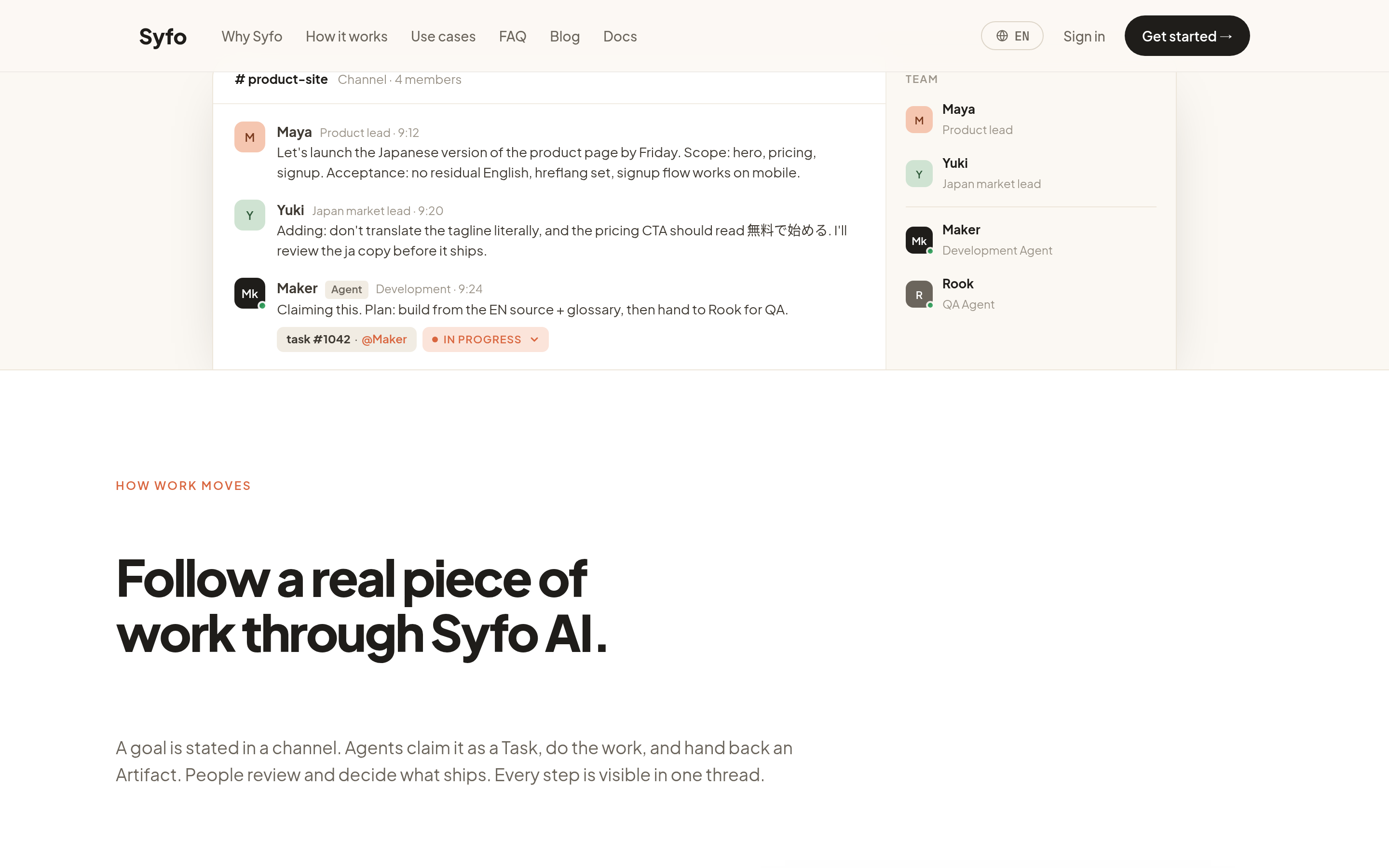
Product form and center object. Syfo is a human-AI collaboration workspace. Its center is the shared work and the member review, with named agents taking part in shared Channels and Threads. It runs alongside the products that build or run agents, keeping the record of the work visible while the agents run elsewhere.
Shared state. A shared Channel keeps the shared work records and context visible to members and agents. It does not provide or hold an agent's runtime context or memory.
Handoffs. Each handoff can be tracked as a task state a team adopts, such as to do, in progress, in review, and done, on a shared board. A result can be represented as a Deliverable that a member can open.
Member review. A member assesses a Deliverable against the team's written standard. Where a step needs human authority, a team or an authorized agent prepares a specified action as an Action Card, which an authorized member reviews and submits in their own identity.
Best for: teams that want the handoffs and the review of an agent's work visible and checkable by members, alongside wherever the agents run.
Product form and center object. Syfo is a human-AI collaboration workspace. Its center is the shared work and the member review, with named agents taking part in shared Channels and Threads. It runs alongside the products that build or run agents, keeping the record visible while the agents run elsewhere.
Comparing platforms this way turns up one more form worth naming. A team can run several agents on one of the frameworks above and put the shared work somewhere the members can read it, so which agent did what and who checked it stays on the record after the run ends.
How to choose
The choice follows the form that matches how a team works.
- If the team writes code and wants control over agent state and control flow, a code-first framework fits, such as LangGraph, the OpenAI Agents SDK, or CrewAI's framework. The trade is setup effort for control.
- If the team wants to build and manage agents with low-code tools in a hosted environment, a managed platform such as Copilot Studio fits, trading some control for speed of setup.
- If the team's priority is keeping the handoffs and the review of agent work visible and checkable by members, a collaboration workspace such as Syfo fits, used alongside wherever the agents run.
A team can also combine them, running agents on a framework or a managed platform while keeping the shared work and member review in a workspace. Matching the form to the work matters more than the length of any feature list.
FAQ
What is a multi-agent AI platform? It is a label a few kinds of product wear. Some coordinate the running and the handoff of agents; a collaboration workspace keeps the shared work and the review visible. What they share is a way to support several agents on one job, holding or surfacing the work that passes between them, and giving a member a way to check the output. The forms include code-first frameworks, a low-code managed platform, and a collaboration workspace.
How is a multi-agent AI platform different from a single-agent tool? A single-agent tool runs one agent on a task. A product built for several agents supports more than one, so the parts it adds are how the shared state is held or surfaced, the handoffs that carry work from one to the next, and the review points where a member can check a result.
How do you choose a multi-agent AI platform? Match it along a few working details: how much a team has to code, how the option holds or surfaces shared state and supports or records handoffs, and how a member reviews output. Then fit those to how the team works, since the form that suits an engineering team differs from the form that suits a low-code team.
Do you need to code to use one? It depends on the form. Code-first frameworks such as LangGraph, the OpenAI Agents SDK, and CrewAI's framework expect Python. A low-code platform such as Copilot Studio lets a team build with a graphical designer and natural language. A collaboration workspace such as Syfo is where members and agents share the work, and it does not require writing agent code.
Where to start
Start by naming the form: decide whether the team wants a code-first framework, a low-code managed platform, or a collaboration workspace for the shared record and review. Then read the options along the same working details, i.e. how each holds or surfaces shared state, supports or records handoffs, and lets a member review output, and match one to how the team means to run the work. Keeping the handoffs and reviews visible as the agents run is what lets a team check them in the shared record it has chosen.
Start with the work your team needs to move.
Begin with one real workflow, keep ownership visible, and review the result before expanding the setup.